



t2.nano Amazon EC2 Instance
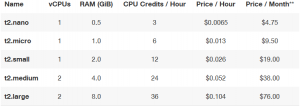
t2.nano Amazon EC2 Instance can now be launched starting at $4.75 per month.
What is t2.nano?
- It is the newest Amazon EC2 burstable-performance instance and lowest priced Elastic compute cloud(EC2) Instance
- Features 512 Mb of memory and 1 vCPU
- Making it well suited for workloads that require a consistent baseline performance with the ability to butst
- T2 instance are backed by the latest Intel Xeon processors with clock speeds up to 3.3GHz
Why t2.nano ?
- t2.nano is recommended for low-traffic website hosting, micro services and developer environments.
- Which have low memory needs and don’t need consistently high levels of CPU on average, but benefit significantly from having full access to very fast CPUs when they need them.
- As the requirements of your workload grow, you can scale to larger T2 instance sizes or other EC2 instance types.
Availability and Purchase
- The t2.nano is available in the US East (N. Virginia), US West (Oregon), US West (San Francisco), EU (Ireland), Asia Pacific (Singapore), Asia Pacific (Tokyo), Brazil (Sao Paolo), and GovCloud (US) regions, with support in EU (Frankfurt) and Australia (Sydney) coming soon.
- T2 instances can be purchased as On-Demand Instances and Reserved Instances.
T2 Instance Details
How to create t2.nano instance from AWS console?
To create EC2 instance t2 nano, Login to AWS console and click on EC2 in shown below

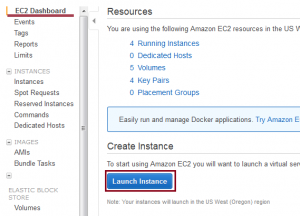
Then it goes to the EC2 Dash board, there we have to launch the instance. Click on Launch Instance to start creating the t2.nano instance.
Next chose your Amazon Machine Image (AMI) according to your requirement.once you select the AMI, the below page will appear there you have to select the type of instance to launch
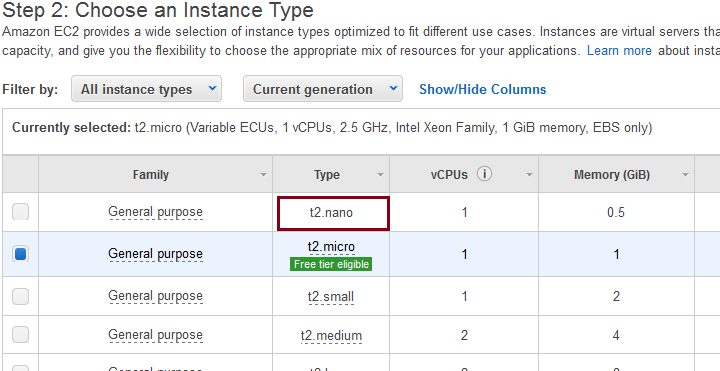
Then follow the steps like configure instance,add storage,tag instance,configure security group and review to launch the instance.
click here for the reference