



IBM Websphere Cast Iron Logs Overview
IBM Websphere Cast Iron Logs provide us a detailed information of the Cast Iron appliance.
IBM Websphere Cast Iron Log Types:
1.Job Log
2.System Log
3.Archived Logs
and
4.Postmortem Logs
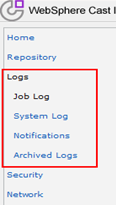
1. Websphere Cast Iron Job Log
The Dashboard displays information about orchestration jobs, including status, timestamp of job events, and key/job ID in multiple tabs:

All – displays orchestration job information for all project configurations.
Recent – displays orchestration job information for the most recently published or modified project configurations.
Favorites – displays orchestration job information for the project configurations displayed in the Favorites filter. Orchestration job information displayed through this filter also displays in the Recent and All filters.
2. Websphere Cast Iron System Log
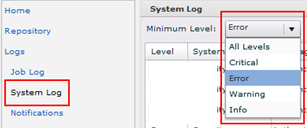
As mentioned in the title, System Logs will give you details about the Cast Iron appliance. From the navigation pane, select Logs > System Log. The System Log page is displayed. Choose the filter values from the lists at the top of the System Log page. You can filter the log entries according to the level of severity for the event, the environment system that generated the log event, dates, and resolution state.
3. Websphere Cast Iron Archived Logs
Logs are archived for downloading and can be accessed using Logs > Archive Logs.
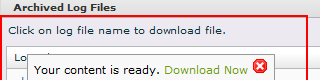
You can purge and archive orchestration monitoring logs. When you configure parameters to archive orchestration monitoring log files, the Integration Appliance archives the log files before polling for conditions that trigger the Integration Appliance to purge additional orchestration monitoring data. You can store archives of purged orchestration monitoring data locally on the Integration Appliance or export the archives to an FTP server. If you do not configure archive settings, the Integration Appliance purges and deletes all orchestration monitoring data that meets the default purging trigger conditions.
4. Websphere Cast Iron Postmortem Logs
Postmortem logs are used during troubleshooting an issue and these logs can be generated using System Command by navigating to System –> Command and then select Postmortem from drop down and download the logs.
