



Websphere Application Server v8.0 fixpack 12 update
Websphere Application Server v8.0 fixpack 12 update process is mentioned below for reference.
1. Download WAS v8.0.0.12 Fixpack from here
2. Unzip both the files to the same directory.
3. If you are using IBM Installation Manager GUI, point out respository.coinfig file from IIM preferences and then click on update.
If you are using silent mode installation prepare an XML file and use it through imcl command from <IIM>/eclipse/tools directory. You need to make sure that the version that needs to be included for v8.0.0.12 is, 8.0.12.20151215_1526
4.On a Linux environment with 8 GB RAM, it took around 5 – 10 mins only to update Websphere Application server.
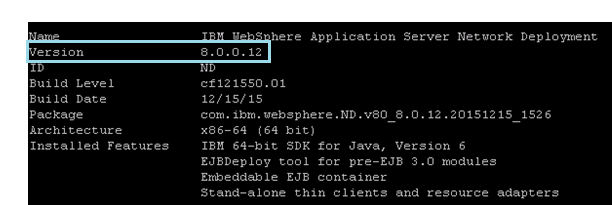
Below images for reference after the update,
From command prompt,
From Console,

Information about Fixpack 12: http://www-01.ibm.com/support/docview.wss?uid=swg24041590
Fix list information for WAS v8.0 FP 12: http://www-01.ibm.com/support/docview.wss?rs=180&uid=swg27022958
A sample XML File used by me during WAS Fp 12 update is given below on Linux,
<?xml version=”1.0″ encoding=”UTF-8″?>
<agent-input>
<server>
<repository location=’/<location of unzipped directory>/repository.config’/>
</server>
<profile id=’IBM WebSphere Application Server Network Deployment V8.0′ installLocation=’/<app server directory>/AppServer’>
<data key=’eclipseLocation’ value=’/<app server directory>/AppServer’/>
<data key=’user.import.profile’ value=’false’/>
<data key=’cic.selector.nl’ value=’en, fr, it, zh, ro, ru, zh_TW, de, ja, pl, es, cs, hu, ko, pt_BR’/>
</profile>
<install modify=’false’>
<offering profile=’IBM WebSphere Application Server Network Deployment V8.0′ id=’com.ibm.websphere.ND.v80′ version=’8.0.12.20151215_1526‘ features=’core.feature,ejbdeploy,thinclient,embeddablecontainer,com.ibm.sdk.6_64bit’/>
</install>
<preference name=’com.ibm.cic.common.core.preferences.eclipseCache’ value=’/<IMShared directory>/IMShared’/>
<preference name=’com.ibm.cic.common.core.preferences.connectTimeout’ value=’30’/>
<preference name=’com.ibm.cic.common.core.preferences.readTimeout’ value=’30’/>
<preference name=’com.ibm.cic.common.core.preferences.downloadAutoRetryCount’ value=’0’/>
<preference name=’offering.service.repositories.areUsed’ value=’true’/>
<preference name=’com.ibm.cic.common.core.preferences.ssl.nonsecureMode’ value=’false’/>
<preference name=’com.ibm.cic.common.core.preferences.http.disablePreemptiveAuthentication’ value=’false’/>
<preference name=’http.ntlm.auth.kind’ value=’NTLM’/>
<preference name=’http.ntlm.auth.enableIntegrated.win32′ value=’true’/>
<preference name=’com.ibm.cic.common.core.preferences.preserveDownloadedArtifacts’ value=’true’/>
<preference name=’com.ibm.cic.common.core.preferences.keepFetchedFiles’ value=’false’/>
<preference name=’PassportAdvantageIsEnabled’ value=’false’/>
<preference name=’com.ibm.cic.common.core.preferences.searchForUpdates’ value=’false’/>
</agent-input>