



-bash: fork: retry: Resource temporarily unavailable
-bash: fork: retry: Resource temporarily unavailable message appears on Linux OS for a particular user id running a Broker process.

Not sure why this occurred but the number of processes that are getting creating while accessing the broker went high and the ulmit values were in less number.
Though there is a IBM Technote mentioning information on the same message, http://www-01.ibm.com/support/docview.wss?uid=swg21700263, but the core issue is related to the ulimit value settings.
set the ulimit value for processes to be unlimited and monitor the OS. In order to make the changes persistent, make sure that /etc/security/limits.conf file is having proper values.
* soft nofile 100000
* hard nofile 200000
“*” in above 2 values are referred to all user ids. If there is any specific user id that is causing problem, please mention that user id as below,
user1 soft nofile 100000
user1 hard nofile 200000
Additionally as mentioned in technote, the fs.file-max may not exist or may be set to low. Review the /etc/sysctl.conf file and the fs-file-max value. If it doesn’t exist, add the following line:
fs.file-max=500000
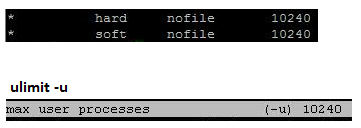
In my case, I have used 10240 as the user process and that resolved the issue. Image below for reference.
/etc/sysctl.conf file as below and then ulimit -u
Command, lsof | grep <user id> | wc -l will give us the number of process that user id is currently handling. Try to check that first and then modify the value.