



GSKit Installation on AIX for TDS LDAP
GSKit Installation on AIX for TDS LDAP is listed below.
Recently on a customer assignment, I was working on a Tivoli Directory Server v6.3 (now referred as Security Directory server) Installation on Redhat Linux OS and was going with a silent mode of installation as there was no UI available for Installation. I have done Tivoli Directory Server installations on AIX as well earlier in the same way. Thought of sharing you the basic GSKit installation process that is required as part of Installation.
I regularly follow the Technote mentioned in IBM Support portal for GSKit Installation Process on AIX, http://www-01.ibm.com/support/docview.wss?uid=swg21577384
Below information taken from above technote link,
Make sure that the installation process takes place through Root user.
1. Download the required GSKit V8 file for AIX platform from IBM Fix Central. The name of the file will be of the form: 8.r.m.f-TIV-GSKIT-AIX-FPnnnn.tar.gz Note: r.m.f are release, maintenance and fix level of GSKit V8 and nnnn is the fix level.
2. Navigate to the path where the GSkit tar fileis copied
cd <path_where_gskit_tar.gz_file_is_kept>
gunzip -c 8*-TIV-GSKIT-AIX-*.tar.gz | tar -xf –
3. The contents of the folder 8.r.m.f-TIV-GSKIT-AIX-FPnnnn :
==> cd 8.r.m.f-TIV-GSKIT-AIX-FPnnnn # Use the correct name as per your download.
==> ls -1 # Output will be as seen below.
.toc
GSKit8.gskcrypt32.ppc.rte
GSKit8.gskcrypt64.ppc.rte
GSKit8.gskssl32.ppc.rte
GSKit8.gskssl64.ppc.rte
Description of the files:
GSKit8.gskcrypt32.ppc.rte – 32 bit IBM GSKit Cryptography Runtime
GSKit8.gskcrypt64.ppc.rte – 64 bit IBM GSKit Cryptography Runtime
GSKit8.gskssl32.ppc.rte – 32 bit IBM GSKit SSL Runtime
GSKit8.gskssl64.ppc.rte – 64 bit IBM GSKit SSL Runtime
4. Install the filesets: (note the dot/period in the command below which denotes current working directory where the installable packages are available)
installp -acXgYd . GSKit8
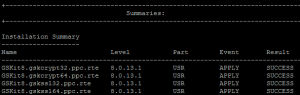
5. After the completion of the above installp command verify the installation summary to see SUCCESS for each fileset. Verify the installed fileset levels as per below command, (I did a grep)
lslpp -l GSKit8*
