



IIB V9.0 fix pack 9.0.0.6 update
IIB V9.0 fix pack 9.0.0.6 update process below. Follow below links to download, understand the fix list in v9.0.0.6 and the process of update.
IBM Integration Bus V9.0 – Fix Pack 9.0.0.6: http://www-01.ibm.com/support/docview.wss?uid=swg24042598
IBM Integration Bus Version 9.0.0.6 Readme: http://www-01.ibm.com/support/docview.wss?uid=swg27040543
IBM Integration Bus Version V9.0 Update process: http://www-01.ibm.com/support/docview.wss?&uid=swg27040545
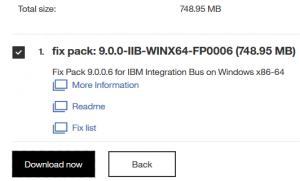
1. Download Fix pack 9.0.0.6 from Fix central based on the Operating system that IBM Integration Bus is installed. Below image that I have downloaded for Windows OS.
2. Unzip the file, 9.0.0-IIB-WINX64-FP0006.zip that got downloaded from step 1.
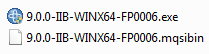
3. Right click on 9.0.0-IIB-WINX64-FP0006.exe and Run as Administrator.
4. Point out to right directory where IIB was installed earlier and proceed to last step.
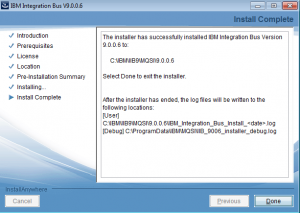
5. Make sure Installation of v9.0.0.6 completes without any errors. Check the logs that are pointed out in the Installation wizard.
6. Check out the version details after the installation.
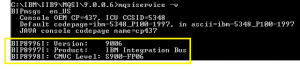
Update process in IBM Integration Bus V9.0 is easy as it creates a new installation folder, with updated version and that will be used for further activities.
We also need to download IBM Integration Toolkit and IBM Integration Explorer fix pack v9.0.0.6 separately as above zip file is for IBM Integration Bus product only. Below links for reference,
IBM Integration Toolkit version 9.0 Fix Pack 6
IBM Integration Explorer V9.0 – Fix Pack 9.0.0.6