



com.vmware.sps.fault.qsconnectionException vCenter error
com.vmware.sps.fault.qsconnectionException vCenter error pops up on the screen freezing the activity of selecting the datastores. While selecting the Datastore for a particular host, i receive below error,
com.vmware.sps.fault.qsconnectionException
which is automatically related to other set of errors, shown below (that have appeared immediately after resolution).
cannot initiate storage service
pbm.fault.PBMFault.summary
As mentioned in VMWARE Knowledge base link, https://kb.vmware.com/selfservice/microsites/search.do?language=en_US&cmd=displayKC&externalId=2064174 follow the process mentioned and it should resolve the error and you should be able to select or view the Data store.
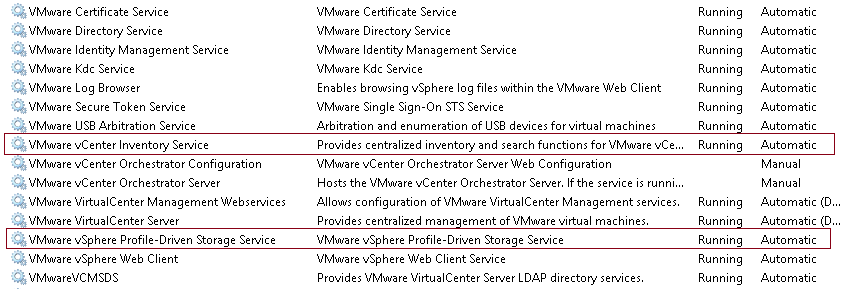
1. Ensure that the VMware Inventory service and the VMware profile Driven Storage Service are running. If the services are not running or in stopped state, start both of them.
2. If VMware Inventory service and the VMware profile Driven Storage Service are running, restart the services. This should resolve the issue. Please make sure that the user id is having Administrator privileges or a Administrator user itself while restarting the services.
Below image for reference on the services,
As mentioned in Knowledge base link, If you want to restart the appliance using Web Interface follow these steps,
1. Log in to the vCenter Server Appliance using URL, http://IP/hostname_of_VC:5480
2. Click the Summary tab under vCenter Server.
3. Click Stop next to vCenter Server.
4. Click Start.